Once student and/or instructor enrollments have been imported from Blackboard into EvaluationKIT, the Enrollment Refresh can be used to add/remove students from the course in EvaluationKIT that have been added/removed from the course in Blackboard.
Using the Enrollment Refresh for Blackboard
NOTE
- The enrollment refresh does NOT make any changes to your data in Blackboard.
- Re-syncing courses has no bearing on the enrollment refresh and does not need to be completed to schedule an enrollment refresh.
- The enrollment refresh will only update your enrollment numbers for the courses within your EvaluationKIT Project.
- The Enrollment Refresh will update enrollments for courses that have been imported via the Blackboard integration only. Courses that are imported or added via other means, i.e. Excel, .csv, or manually created, are not supported with the Enrollment Refresh feature.
You can access the Blackboard Enrollment Refresh by navigating to the Users tab of your project and selecting Data Import Blackboard.
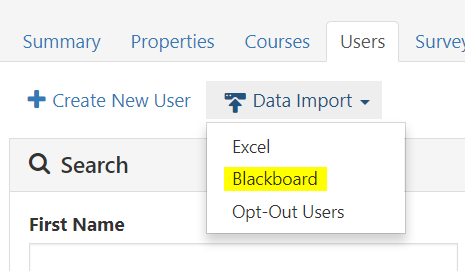
Blackboard Enrollment Refresh
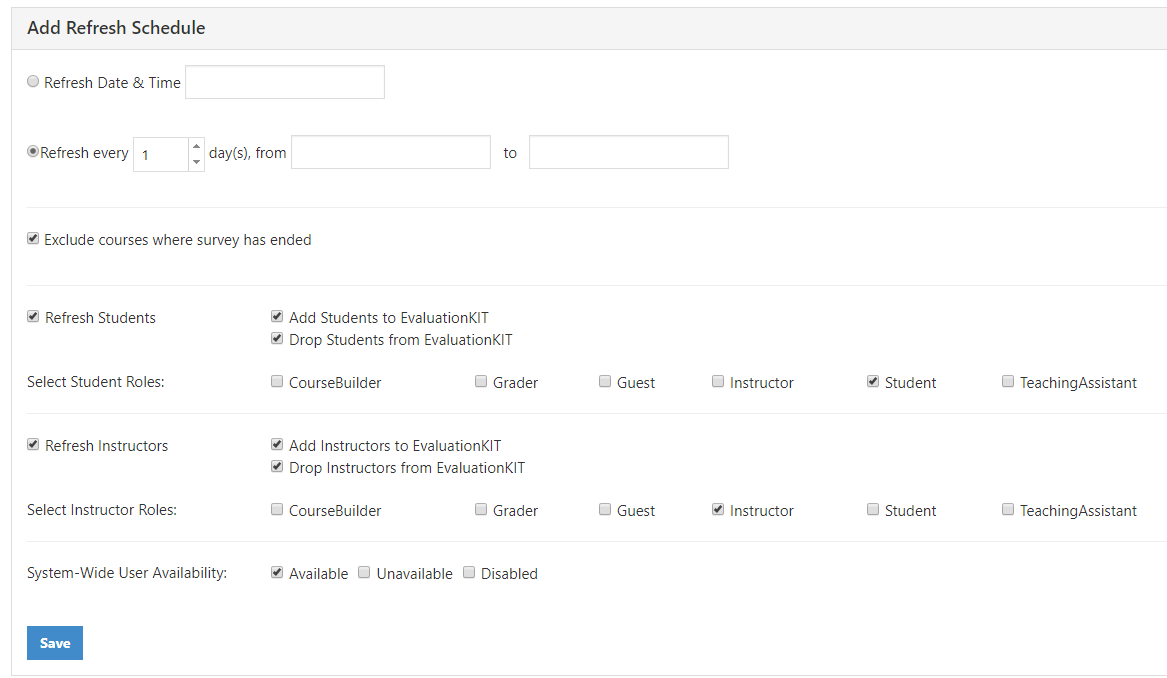
Add Refresh Schedule
- The enrollment refresh can be scheduled to run at a specific date and time or as a recurring refresh within a specified time frame.
Exclude courses where survey has ended:
- This option allows you to exclude courses from the enrollment refresh where the survey has ended for both course-level and project-level end dates prior to the scheduled run date.
Refresh Students:
- Select this option if you wish to refresh student enrollments.
- Select Student Roles: Select the roles you user for students that you wish to refresh
Refresh Instructors:
- Select this option if you wish to refresh instructor enrollments.
- Select Instructor Roles: Select the roles you use for instructors that you wish to refresh
System-Wide User Availability:
- Select the user availability status for users you wish to refresh.
Below are a few things to keep in mind about the enrollment refresh:
- You can schedule multiple refresh instances.
- Enrollment refreshes can be done before, during or after a project has ended.
- Students who have already submitted survey responses and are dropped from a course within the project will have their results removed from the project results.
- Scheduling an enrollment refresh for a date/time in the past will refresh for that project immediately.
- The amount of courses/enrollments within your project will determine the length of time that the refresh takes to update enrollments within a project.
All data transfers behind the scenes are secure using SSL encryption for security purposes.